
Musikalis Guides
Royalty-Free AI Music for YouTube
Learn how to create royalty-free AI music for YouTube videos, shorts, podcasts, product demos, and social content with clear prompts and publishing checks.
These pages are built around specific intents users actually search for, then route them into the right creation flow.
YouTube creators often need background music that fits the video, avoids generic stock loops, and can be created quickly. Musikalis helps you generate original tracks for intros, talking-head videos, shorts, tutorials, vlogs, podcasts, and product demos.
Quick answer
To create royalty-free AI music for YouTube, generate an original instrumental or song in Musikalis, keep the prompt specific to your video style, review the track for vocal or lyric issues, download the final version, and confirm your license needs before publishing.
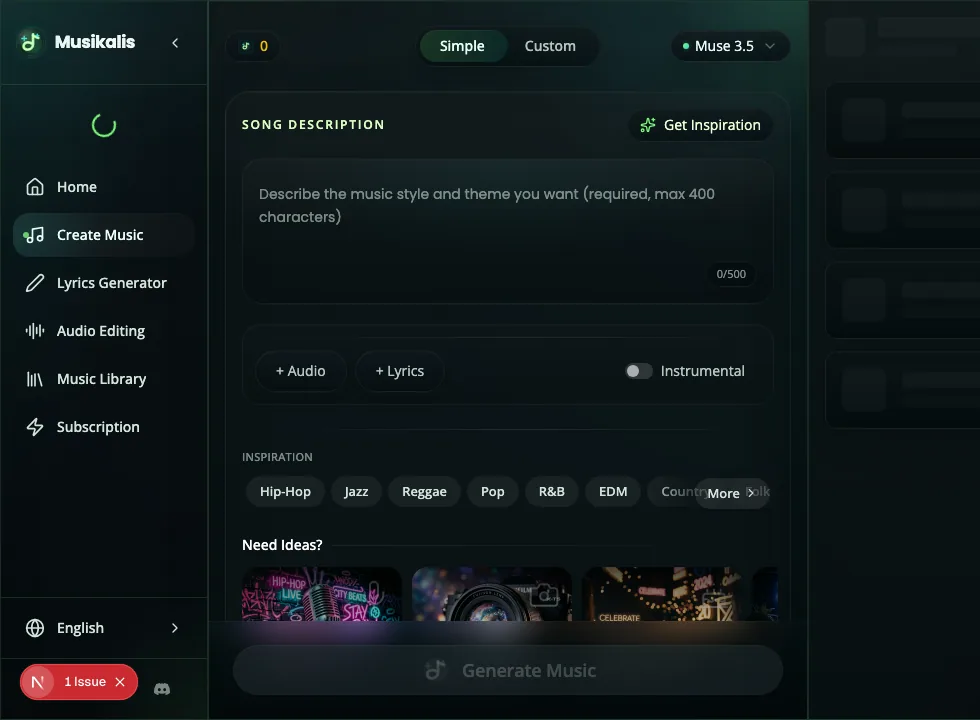
For YouTube workflows, this is where you set the use case, keep the prompt instrumental-focused, and iterate until the track leaves enough room for narration.
Step 1: Decide where the music appears
Music for YouTube should be written for a specific moment, not for the whole channel.
| Video moment | Best prompt direction |
|---|---|
| Intro | Short, memorable, branded, energetic |
| Background under speech | Instrumental, low intensity, no vocals |
| Product demo | Clean, modern, steady pulse |
| Travel vlog | Warm, upbeat, acoustic or tropical |
| Documentary scene | Ambient, cinematic, emotional |
| Shorts/Reels | Hook-driven, high energy, fast impact |
If the music sits under speech, add "no vocals" and "subtle arrangement" to your prompt.
Step 2: Generate the track
Open the AI Music Generator and start with a use-case prompt.
Example for a tech review:
Create a royalty-free instrumental background track for a YouTube tech review, with clean synth bass, light drums, subtle arpeggios, modern tone, no vocals, and enough space for narration.Example for a travel vlog:
Create an upbeat acoustic pop instrumental for a sunny travel vlog, with warm guitar, hand claps, light percussion, soft bass, no vocals, and an adventurous mood.Example for a podcast intro:
Create a 20-second podcast intro with warm piano, soft electronic pulse, memorable melody, professional tone, and no singing.Step 3: Review for publishing
Before publishing, listen for:
- Vocals that compete with narration.
- Lyrics that introduce unwanted meaning.
- Drops or loud sections that distract from the video.
- A mood that conflicts with the visual scene.
- A mix that is too busy for background use.
If the track is too distracting, regenerate with words like "minimal", "subtle", "no vocals", "soft drums", or "background music".
Step 4: Match music to content type
| Content type | Prompt idea |
|---|---|
| Tutorial | "calm modern instrumental, no vocals, steady rhythm" |
| Gaming highlight | "energetic electronic track, heavy impact, fast cuts" |
| Beauty or lifestyle | "soft pop, warm synths, polished but relaxed" |
| Business video | "clean corporate pop, light piano, confident tone" |
| Meditation | "ambient pads, slow movement, no percussion" |
| Study video | "lofi hip hop, mellow piano, relaxed drums" |
For study and focus content, try the AI Lofi Music Generator.
Step 5: Save versions
Keep multiple versions in your Music Library. You may want:
- A short intro version.
- A longer background version.
- A high-energy version for transitions.
- A calmer version for narration.
This gives you a reusable music kit for future videos.
Licensing note
Musikalis is designed for original AI-generated music, but publishing requirements depend on your plan, platform, and use case. Before uploading monetized videos, review your account terms and the relevant platform policies.
If commercial publishing is important, compare plan details on Pricing before using a track in client work, ads, or monetized content.
Common mistakes
- Using a vocal song under voiceover.
- Generating one long track for every section of the video.
- Forgetting to make a short intro version.
- Using an emotional style that does not match the visual scene.
- Publishing without checking plan and license needs.
Next steps
- Generate background music with the AI Music Generator.
- Improve prompts with How to Write AI Music Prompts.
- Copy starting points from AI Music Prompt Examples.