Best AI Music Generators in 2026: Top 8 Tools Compared
Compare the best AI music generators of 2026, including current models, editing tools, free plans, download limits, and commercial-use rules.
 Musikalis
AI music generation has moved well beyond “type a prompt and hope.” In 2026, the meaningful differences are the model you can access, how much of a song you can edit, whether you can download the result, and what the license actually permits.
This guide keeps the original Top 8 selection and ranking, but updates the facts as of August 12, 2026. Several material changes have occurred since publication: Suno launched v5.5 and announced new download limits, Udio disabled downloads during its UMG transition, ElevenLabs released Music v2, and Beatoven replaced its older duration story with the Maestro workflow.
Quick comparison: the best AI music generators in 2026
Top 8 AI music generators at a glance
Free access, limits and licensing can change. The entries below were re-checked against official product, pricing, help and license pages on August 12, 2026.
Musikalis
- Best for
- An all-in-one creator workflow
- Vocals
- Yes
- Editing & control
- Prompt, lyrics, photo, cover, vocal removal and beat tools
- Free access
- Free entry point; one-off diamonds available
- Current length
- Up to 8 min
- Main catch
- Public product claims and legal terms should be checked together
Suno
- Best for
- Fast, complete songs and a studio workflow
- Vocals
- Yes
- Editing & control
- Studio, stems, Voices, Custom Models and section tools
- Free access
- 50 daily credits on the free plan
- Current length
- Up to 8 min
- Main catch
- New download caps take effect September 3, 2026
Udio
- Best for
- Creative iteration in the browser
- Vocals
- Yes
- Editing & control
- Extend, remix and inpaint
- Free access
- Daily and monthly free credits
- Current length
- Clip-based; extend in the editor
- Main catch
- Audio, video and stem downloads are currently disabled
MusicCreator AI
- Best for
- Beginners and guided song templates
- Vocals
- Yes
- Editing & control
- Lyrics, cover, extension and music-video tools
- Free access
- 30 credits/year (15 generations)
- Current length
- Not clearly disclosed
- Main catch
- Commercial rights are attached to annual plans, not monthly plans
ElevenLabs Music
- Best for
- Expressive vocals, references and API workflows
- Vocals
- Yes
- Editing & control
- Inpainting, reference audio and section-by-section creation
- Free access
- Web access; API usage is paid
- Current length
- Up to 5 min
- Main catch
- Commercial use depends on the applicable plan and terms
Beatoven.ai
- Best for
- Instrumental background music and sound effects
- Vocals
- No
- Editing & control
- Exact duration, mood and composition controls
- Free access
- Generate for free; pay to download
- Current length
- Up to 2 min 30 sec
- Main catch
- No direct release of the raw track to Spotify or Apple Music
Mubert
- Best for
- Apps, streams and long-running background audio
- Vocals
- No
- Editing & control
- Render, API and real-time streams
- Free access
- Limited free access
- Current length
- Up to 25 min or an infinite stream
- Main catch
- Usage rights vary substantially by product and license
SOUNDRAW
- Best for
- Video, podcast and creator soundtracks
- Vocals
- No
- Editing & control
- Timeline, structure, energy and stems on eligible plans
- Free access
- Create and preview free; downloading is paid
- Current length
- Customizable
- Main catch
- DSP release requires the Artist plan and material modification
How we evaluated these tools
This is a documentation-led editorial comparison, not a controlled blind audio benchmark. We re-checked each provider's current product pages, release notes, pricing or credit rules, export status, and public licensing language. Where a provider does not disclose a limit clearly, we say so rather than filling the gap with an estimate.
The ranking considers five practical questions:
- Creation scope: Can it make a complete song, instrumental background, sound effect or continuous stream?
- Control: Does it support lyrics, duration, references, stems, remixing, extension or inpainting?
- Workflow: Can a beginner get a useful result without moving between several products?
- Export and reuse: Can the result be downloaded, edited elsewhere and used in the intended channel?
- License clarity: Is the commercial path stated clearly enough for a creator to make a publishing decision?
Audio quality remains partly subjective and prompt-dependent. A short trial with your own genre, language and vocal requirements is more useful than treating any “best sounding” claim as universal.
The 8 best AI music generators
1. Musikalis — Best all-in-one AI music platform
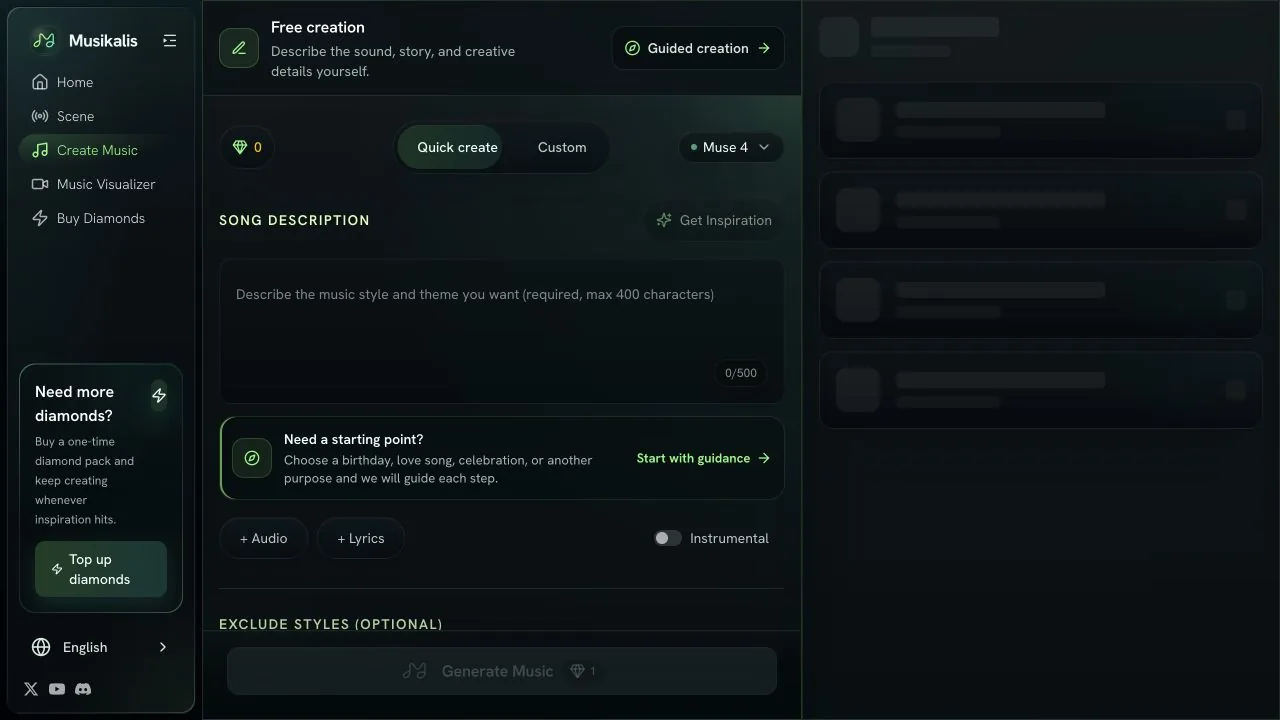
Musikalis remains the best overall fit in this list for users who want a connected creation toolkit rather than a single generator. The current workflow can start from a text description, custom lyrics, a photo or a hummed idea, with instrumental mode available when vocals are not needed.
The important differentiator is what happens around the song. Musikalis also connects creators to AI beat making, lyrics generation, vocal removal, covers and music-video creation. That reduces tool switching for creators who need to turn one idea into several assets.
Current Musikalis pricing offers one-time diamond packs alongside monthly and yearly subscriptions, so occasional users do not have to maintain a recurring plan. Purchased diamonds are listed as non-expiring. Standard song generations start at one diamond, although higher-cost models and adjacent tools can consume more.
Best for: Creators who value an integrated song-to-content workflow and flexible one-off credits.
Important caveat: Musikalis product pages describe generated music as royalty-free, but the current public Terms do not define generated-output ownership as explicitly as the best license pages in this comparison. For client work or a commercial DSP release, check the active terms and keep a copy of the applicable plan details.
2. Suno — Best for fast full songs and studio editing
Suno is no longer just a simple prompt-to-song product. Suno v5.5 is the current flagship model and adds Voices, Custom Models and My Taste alongside stronger arrangements and vocals. Suno Studio provides a multitrack timeline, stem workflows, warp markers, alternates and more detailed arrangement controls.
The free plan still provides 50 daily credits and uses a free-access model, but free-plan songs do not receive commercial-use rights. Songs created while subscribed to Pro or Premier can receive commercial-use rights under Suno's terms.
The major 2026 change is download policy. Suno announced new Terms of Service, effective September 3, 2026: free accounts receive up to seven lifetime trial downloads, Pro receives 20 downloads per month, Premier receives 60, and Premier users with Suno Studio retain unlimited downloads. Suno says songs downloaded under an eligible paid plan keep their commercial rights.
Best for: Quickly generating complete vocal songs, then refining promising ideas in a deeper studio environment.
Main limitation: After the new policy takes effect, creators who export frequently must factor download allowance—not only generation credits—into the cost.
3. Udio — Best browser editor, but exports are disabled
Udio remains compelling for experimentation. Its v1, v1.5 and Allegro options support different speed and fidelity trade-offs, while Extend, Remix and Inpaint make it possible to iterate on a specific part instead of regenerating everything.
However, the product's practical value changed materially after its Universal Music Group partnership. According to Udio's official partnership-transition notice, downloads of audio, video and stems are currently disabled. You can still create, edit and share a Udio URL, but you cannot export a master into a DAW or distributor.
The current credit structure lists 2,400 monthly credits for Standard and 6,000 for Pro, while free users receive 10 daily credits within a 100-credit monthly limit.
Best for: Exploring unusual genre blends and learning from browser-based remix and inpainting workflows.
Main limitation: If your end goal requires a WAV, stems or commercial distribution today, the lack of downloads is a disqualifying constraint—not a minor inconvenience.
4. MusicCreator AI — Best for guided beginner workflows
MusicCreator AI organizes creation around approachable tasks: lyrics-to-song, AI song covers, extension, vocal removal and music-video generation. That guided structure is useful for a beginner who knows the outcome they want but does not want to learn a DAW-like editor.
Its current pricing page is less generous than older summaries suggest. The free plan lists 30 credits per year, equal to 15 generations. More importantly, the FAQ states that commercial licensing belongs to annual plans, not monthly plans; it says the annual commercial license applies retroactively to songs in the account.
Best for: Occasional creators who prefer clear task-based entry points over advanced production controls.
Main limitation: Compare annual and monthly terms carefully. “Premium” does not automatically mean the same commercial rights across billing periods.
5. ElevenLabs Music — Best for expressive vocals and reference-driven control
ElevenLabs has moved beyond its original voice-first positioning. ElevenLabs Music v2 improves vocals, instrumentation, arrangement and multilingual performance, while adding reference audio, inpainting and section-by-section composition.
That makes it useful when you want to provide musical context or repair a specific region instead of relying only on a text prompt. The web product supports tracks up to five minutes. ElevenAPI provides a paid programmatic path for music generation, but ElevenLabs's August update says Music v2 itself is still coming soon to the API.
Commercial use is not “enterprise only,” as older comparisons often claim. It depends on using an eligible plan and following the applicable ElevenLabs terms and restricted-use rules.
Best for: Expressive vocal music, multilingual work, reference-guided composition and paid API integrations.
Main limitation: Credit consumption and commercial permissions should be evaluated against the exact web or API plan you will use.
6. Beatoven.ai — Best for exact-length background music and sound effects
Beatoven.ai is built for instrumental scoring rather than vocal songs. Its current Maestro model supports exact duration up to 2 minutes 30 seconds, 44.1 kHz output, prompt-based music and sound effects, and training on licensed data.
That 2:30 ceiling corrects the older “up to 15 minutes” claim. In return, Beatoven focuses on use cases where control matters more than pop-song vocals: YouTube videos, podcasts, games, ads, audiobooks and presentations.
When you download a track, Beatoven grants a non-exclusive, perpetual sync license for the selected use. Beatoven retains ownership of the underlying track and does not allow direct distribution of an unaltered result to Spotify, Apple Music and similar music-streaming services.
Best for: Creators who need a precisely timed instrumental or sound effect under visual or spoken content.
Main limitation: It is not designed to produce a vocal single or a raw track for direct DSP release.
7. Mubert — Best for APIs and continuous background audio
Mubert is the specialist in this list for functional, continuous music. Mubert Render creates downloadable tracks, while the Mubert API v3 targets apps, games, live streams, wellness products and physical spaces.
The API advertises tracks and DJ mixes up to 25 minutes, infinite streaming, and more than 150 genre, mood and activity categories. That makes it a better fit than a verse-chorus song generator when the music needs to adapt or continue without an obvious endpoint.
Best for: Developers, streamers and businesses that need scalable background audio rather than a foreground vocal track.
Main limitation: Licensing is product-specific. A creator download, a business soundtrack and an API integration are not interchangeable rights packages.
8. SOUNDRAW — Best for editable creator soundtracks
SOUNDRAW combines AI-generated instrumental music with timeline controls for energy, structure and length. This makes it efficient for matching a track to cuts in a video, podcast segment or branded piece without composing from scratch.
Its license page separates two important workflows. The Creator license is designed for background use in content. The Artist license supports releasing music to services such as Spotify, but the finished song must be materially modified so that it sounds clearly different from the original download. SOUNDRAW also prohibits registering the generated material with Content ID.
Best for: Video and podcast creators who want to shape a soundtrack visually, plus artists willing to transform the source substantially.
Main limitation: “Commercial use” does not mean you may upload the raw download unchanged or claim it through Content ID.
Best AI music generator by use case
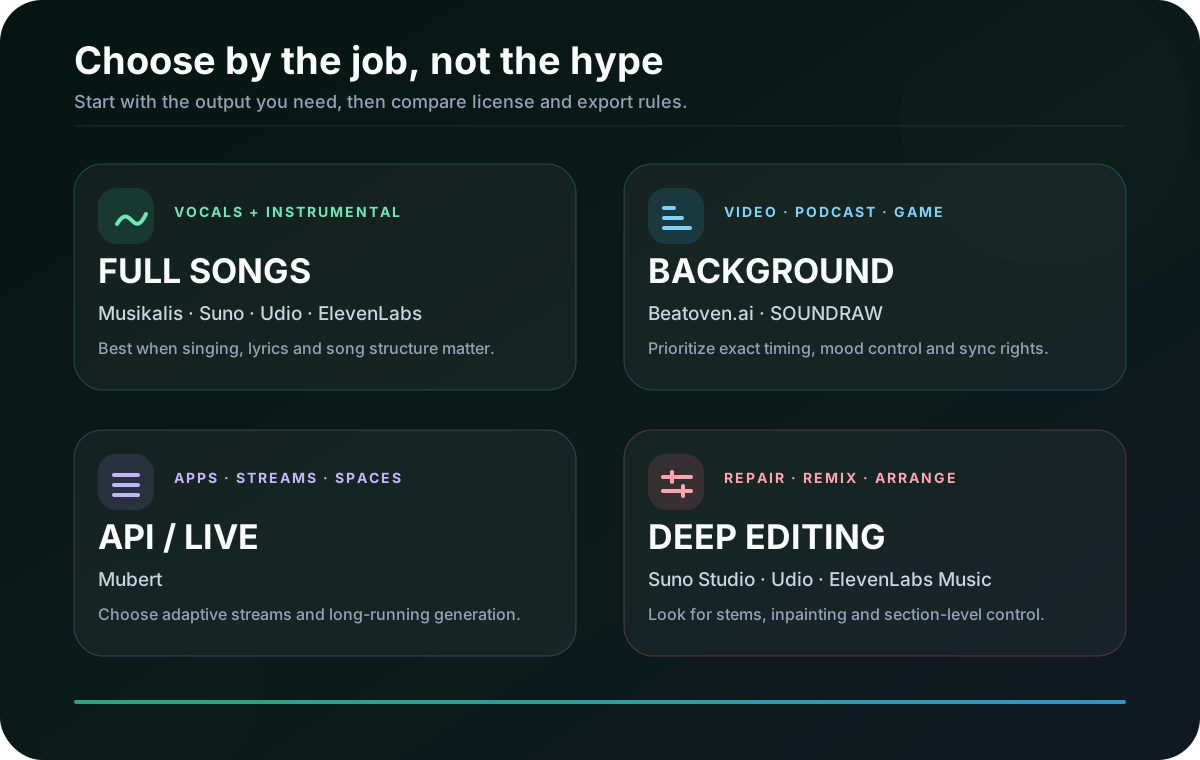
There is no honest universal winner because these products now solve different jobs. A foreground song with vocals, a two-minute video score and an infinite in-app stream have incompatible requirements.
Match the tool to the output
Use this as a shortlist, then test the same brief in two tools before paying.
One workspace for creating and repurposing songs
- First choice
- Musikalis
- Alternative
- Suno
- Why
- Song generation sits beside lyric, beat, cover and vocal tools.
Generate a finished song as quickly as possible
- First choice
- Suno
- Alternative
- Musikalis
- Why
- Fast prompting, strong vocals and a mature creation workflow.
Repair or rearrange specific sections
- First choice
- Suno Studio
- Alternative
- ElevenLabs Music
- Why
- Both now go beyond one-shot generation with targeted editing.
Score a video, podcast or presentation
- First choice
- Beatoven.ai
- Alternative
- SOUNDRAW
- Why
- Both focus on timing, mood and sync-oriented licensing.
Add adaptive music to an app or live stream
- First choice
- Mubert API
- Alternative
- ElevenLabs API
- Why
- Mubert specializes in continuous generation; ElevenLabs suits song APIs.
Release an AI-assisted track to streaming services
- First choice
- Suno paid plan
- Alternative
- SOUNDRAW Artist
- Why
- Both provide a defined path, but plan, download and modification rules differ.
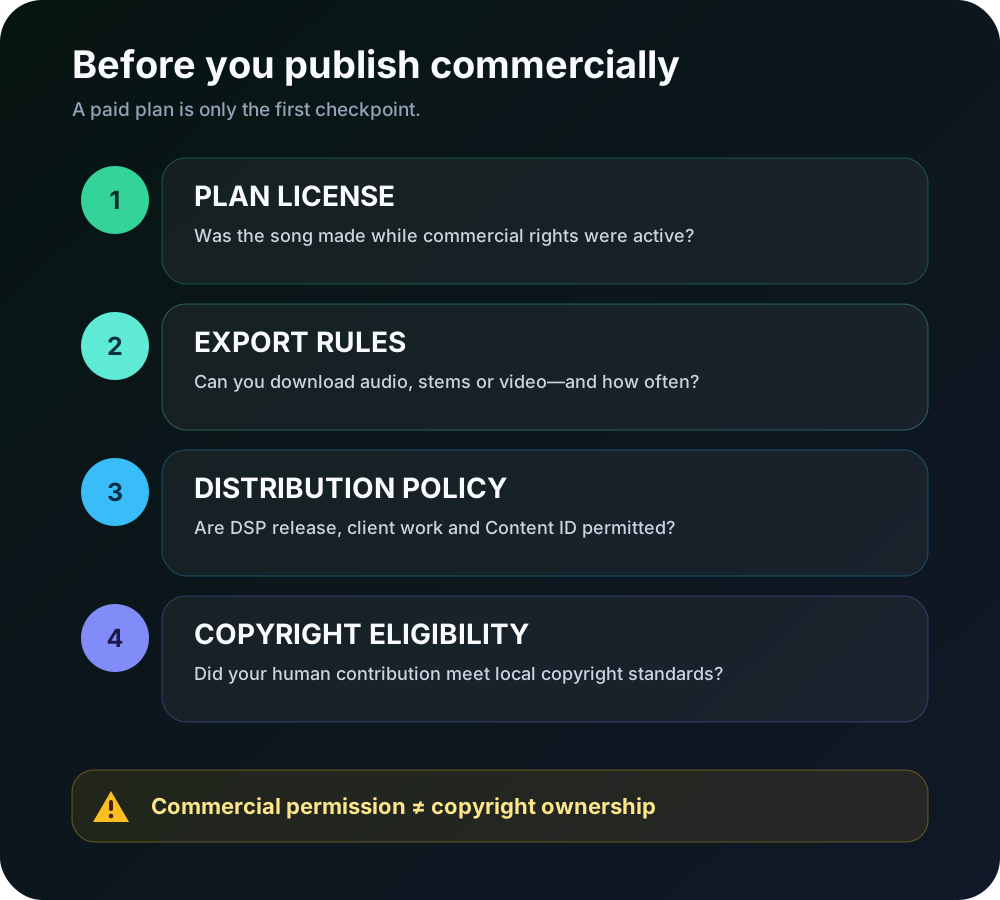
Commercial use: permission, export and copyright are different
A platform may grant commercial-use permission without assigning copyright ownership. It may allow a YouTube soundtrack but prohibit a raw Spotify release. It may grant rights to songs created on a paid plan while limiting whether—or how often—you can download them.
For a material release, save the receipt, plan name, generation date, download date and a copy of the terms that applied. Copyright eligibility also depends on human contribution and local law; a platform license cannot guarantee that a fully AI-generated work will receive copyright protection in every country.
Commercial-use and export checklist
This is a practical summary, not legal advice. Always review the current provider terms for your exact use.
Musikalis
- Current commercial path
- Public pages describe generated music as royalty-free
- Download / export
- Audio downloads are part of the creator workflow
- What to check before publishing
- The current public Terms do not clearly spell out generated-output ownership; verify the active terms for client or DSP work.
Suno
- Current commercial path
- Songs made while subscribed to Pro or Premier receive commercial-use rights
- Download / export
- From Sep 3: Free 7 lifetime, Pro 20/month, Premier 60/month; Studio remains unlimited
- What to check before publishing
- Free-plan songs are noncommercial. Keep proof of the plan and the date the song was created and downloaded.
Udio
- Current commercial path
- No practical release workflow while downloads remain unavailable
- Download / export
- Audio, video and stem downloads are disabled during the UMG transition
- What to check before publishing
- A shareable Udio URL is not a downloadable master for distribution.
MusicCreator AI
- Current commercial path
- Commercial license is listed for annual plans and applies retroactively under its FAQ
- Download / export
- Plan-dependent downloads
- What to check before publishing
- Monthly subscriptions do not currently include the same commercial license.
ElevenLabs Music
- Current commercial path
- Commercial use is available under eligible paid terms
- Download / export
- Web export and paid API access
- What to check before publishing
- Review restricted uses and the exact plan that covered the generation.
Beatoven.ai
- Current commercial path
- A downloaded track receives a non-exclusive, perpetual sync license
- Download / export
- Pay per download or use a subscription
- What to check before publishing
- Beatoven retains ownership and does not permit direct raw-track distribution to music DSPs.
Mubert
- Current commercial path
- Creator, business and API licenses cover different uses
- Download / export
- Track downloads, API output or continuous streaming
- What to check before publishing
- Match the license to advertising, client work, apps, broadcasts or public spaces.
SOUNDRAW
- Current commercial path
- Creator covers background use; Artist supports music releases after modification
- Download / export
- Downloads require a paid plan
- What to check before publishing
- Do not release the raw download as-is or register it with Content ID.
Notable new AI music options in 2026
Two releases deserve attention even though we are not changing the established Top 8 in the middle of this update:
- Google Lyria 3 Pro entered public preview for developers with approximately three-minute full songs and embedded SynthID watermarking. Google's developer announcement makes it especially relevant for teams already building on Google's AI stack.
- Stable Audio 3 expanded Stability AI's model family with medium-length generations up to 6 minutes 20 seconds, training on licensed data, and open-weight variants under their applicable licenses. See the official Stable Audio 3 release.
Both could earn a place in a future full re-test. For now, Lyria 3 Pro is still described as a public preview and Stable Audio 3's open models serve a more technical experimentation workflow than most tools in this consumer-oriented comparison.
Frequently asked questions
What is the best AI music generator in 2026?
Musikalis is our best all-in-one choice because it combines song generation with lyric, beat, cover, video and vocal tools. Suno is the stronger dedicated choice when fast full-song generation and Studio editing matter more than having several adjacent creator tools. The best answer changes for background scoring, APIs and streaming releases.
Which AI music generator is best for free use?
For frequent experimentation, Suno's 50 daily credits are useful, but free-plan generations are noncommercial and its trial-download cap is scheduled to begin September 3, 2026. Musikalis provides a free entry point and lets occasional users buy non-expiring diamonds instead of maintaining a subscription. Always judge “free” by generation, download and commercial-use limits together.
Is anything better than Suno?
For some jobs, yes. Musikalis offers a broader connected toolkit; Beatoven.ai and SOUNDRAW are more purpose-built for background scoring; Mubert is better suited to continuous API music. Suno remains one of the most capable options for quickly making a complete vocal song and then editing it in a studio-style workflow.
Is Suno better than Udio right now?
For users who need downloadable audio, Suno is currently the more practical option because Udio has disabled audio, video and stem downloads during its UMG transition. Udio still offers a strong browser-based creative editor, but the export restriction changes the buying decision.
Can I sell or monetize AI-generated music?
Sometimes, but only when the plan and the intended channel allow it. Check whether the song was created on an eligible paid plan, whether the provider permits downloads and DSP distribution, whether modification is required, and whether Content ID is prohibited. Commercial permission from a platform is not the same as a guarantee of copyright ownership.
Verdict
For most creators who want one place to generate a song and continue working with it, Musikalis offers the best balance of scope, accessibility and workflow. Its one-off credit model and connected song, beat, lyrics and vocal-removal tools remain a meaningful advantage.
Choose Suno when complete vocal songs and advanced studio editing are the priority. Choose Beatoven.ai or SOUNDRAW for sync-oriented background music, and Mubert for continuous or API-driven audio. Udio remains creatively interesting, but its disabled downloads prevent us from recommending it for an export-dependent project today.
Whichever tool you choose, run a small test in your real genre and language, download a sample before committing, and read the current license for the exact publishing channel you intend to use.
Research cutoff: August 12, 2026. Product features, credits, download policies and licenses can change; official provider pages linked above take precedence over this comparison.